Rates and policies
Rate plans, seasons and policies; editing prices per season, category and occupancy; supplements.
Rate plans
A rate plan is a price list for one market and currency, for example International (USD) or Egyptian residents (EGP). Each plan says:
- per person or per cabin;
- per night or per package (the whole itinerary);
- its board, its child policy, its cancellation policy and its payment policy.
Making a plan (owners)
+ New rate plan for the ship chosen at the top. Fill in a name and a short code, the market (from your list in Settings) and the currency (USD, EUR, EGP, GBP, SAR, AED, QAR, CHF, CAD, AUD, KWD, BHD or OMR; each plan has its own, so each market can have its own currency), how prices are counted (per person or per cabin, each night or the whole itinerary), the board, the minimum nights and the three policies. What the price includes and does not include (one item per line, in English and Arabic) is printed on vouchers.
Leave Sell in the back office ticked: your staff can then book this plan at once. To sell it through an agency or an online platform too, give that channel a contract on Channels, or tick it under Sold through when you edit the plan.
Edit plan changes the name, board, policies, inclusions, which channels sell it, and whether it is on sale. Once a plan has prices, its market, currency and the way prices are counted are fixed, because the prices would mean something else: make a new plan instead. A plan with no prices, supplements or bookings can be deleted.
Editing rates (owners)
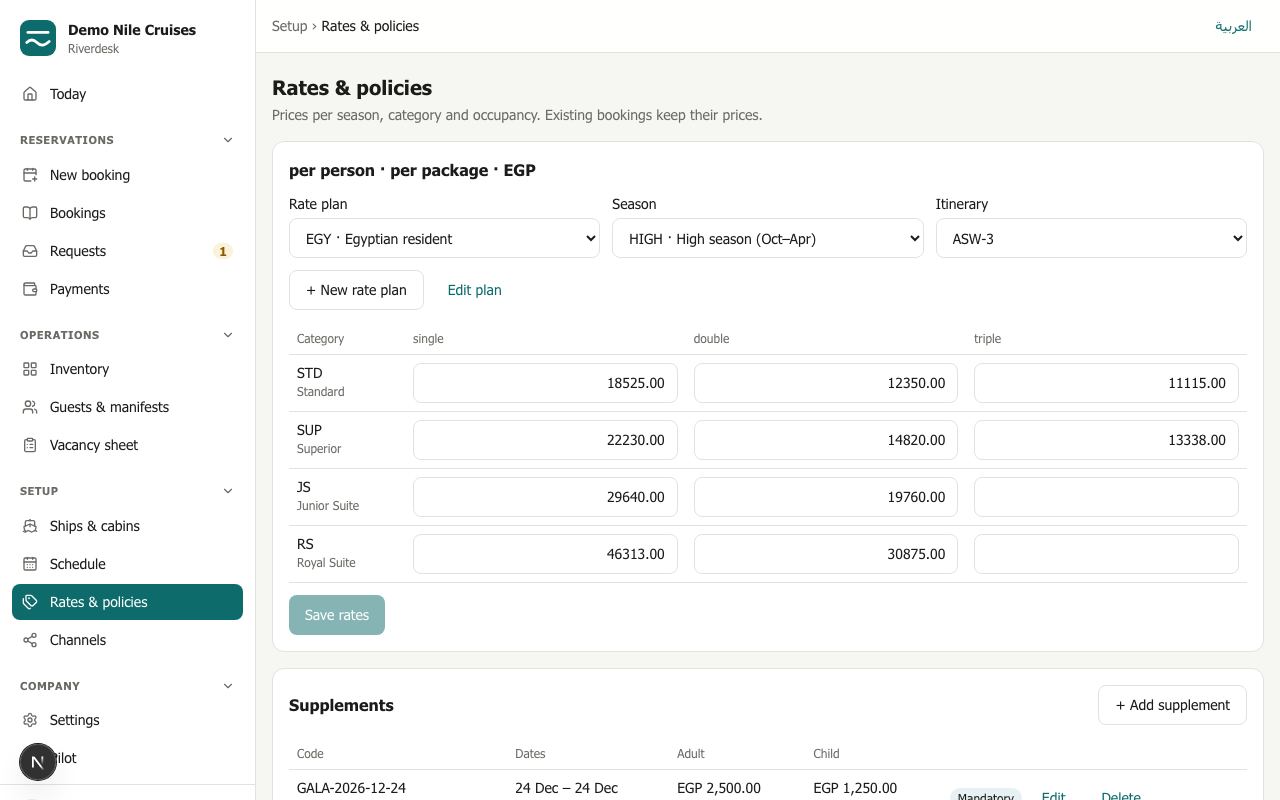
- Choose the rate plan and the season. Package plans also need the itinerary.
- Type prices in the grid: one row per category. Per-person plans have a column for single, double and triple occupancy (the price per person when one, two or three adults share a cabin).
- Save rates. The number of changes is shown before you save.
New prices apply to new quotes and bookings only. Existing bookings keep the price they were sold at.
Supplements
Supplements are extra charges on dates inside a plan, such as a gala dinner at New Year: a price per adult and per child, mandatory or optional. Add supplement creates one for the chosen plan; Edit and Delete change or remove it. Bookings already made keep the supplements they were priced with.
Seasons (owners)
A season is a set of dates priced the same way, for each ship: for example High (October to April) and Low (May to September). A sailing is priced with the season of the day it starts, for all its nights.
+ Add season: a short code (such as HIGH, it cannot change later), a name, and one or more date ranges. A season can have several ranges, such as Christmas and Easter, but a date belongs to one season only: overlapping dates are refused.
A yellow note lists the sailings whose start date no season covers. Those sailings cannot be priced, so they cannot be sold until a season includes their start date. Extend your seasons whenever the schedule is extended.
Edit changes the name and dates. A season can be deleted only while it has no rates.
Policies (owners)
Policies are shared by all your ships; each rate plan picks one of each. A policy used by a rate plan cannot be deleted. Each booking keeps a copy of the policies it was sold under, so changing a policy never changes an existing booking's terms: the change applies to new quotes only, and channels are told.
Cancellation
Steps by days before embarkation, each with the share of the booking kept. For example:
| From | Penalty |
|---|---|
| 60 days | 0% |
| 30 days | 25% |
| 0 days | 100% |
The step for 0 days is required: it covers the last days and a no-show. Amendment fees (optional) are charged when a booking is changed: for a kind of change (date, category, guests per cabin, number of cabins, guest names, or any), from a number of days before embarkation, as a fixed amount or a percentage of the booking.
Children
- Adult from age: guests this age or older pay as adults (usually 12).
- Children per cabin: the most children one cabin takes.
- Age bands: from age 0 up to the adult age, each band priced as free, a percentage of the adult price, a fixed price, or included (no charge, but counts as a guest). Type only the last age of each band; the next band starts after it. Tick with two adults when the price applies only when two adults share the cabin.
Payment
- Deposit % taken at confirmation, and the balance due a number of days before embarkation. Bookings made later pay in full.
- How long an unpaid booking keeps its cabins is not part of the policy: it is the company's Unpaid booking held setting in Settings.
- Cancel unpaid bookings automatically after a number of days past the balance date. When it is off, overdue bookings only appear on Today.