Take deposits and balances
Record deposits and balances, refunds and corrections, and keep Today clear of money that is due.
When guests book directly with you, they pay you in two steps: a deposit that confirms the booking, and the balance before the cruise. This guide shows how to record each payment, how to refund, how to correct a mistake, and how Today tells you who still owes what. It applies to your own bookings; agencies on credit and platforms that collect payment settle with you separately.
Before you start
- You can sign in as Finance or Owner. Only these roles can record payments, refunds and corrections.
- The money has arrived, or you hold a receipt: a bank transfer, cash at the office or a card payment.
- You have the booking reference, such as
VS-26-00610, or the guest's name to search for it.
How deposits and balances are worked out
Each rate plan has a payment policy, and each booking keeps a copy of the one it was sold with. The policy sets the Deposit % and the Balance due date. With a 25% deposit and the balance 30 days before embarkation, a USD 2,480 booking owes USD 620 at once and USD 1,860 thirty days before the guest boards in Luxor. A booking made less than 30 days before the cruise owes the full amount straight away.
The booking page shows both under Payments due, with their dates.
Record a payment
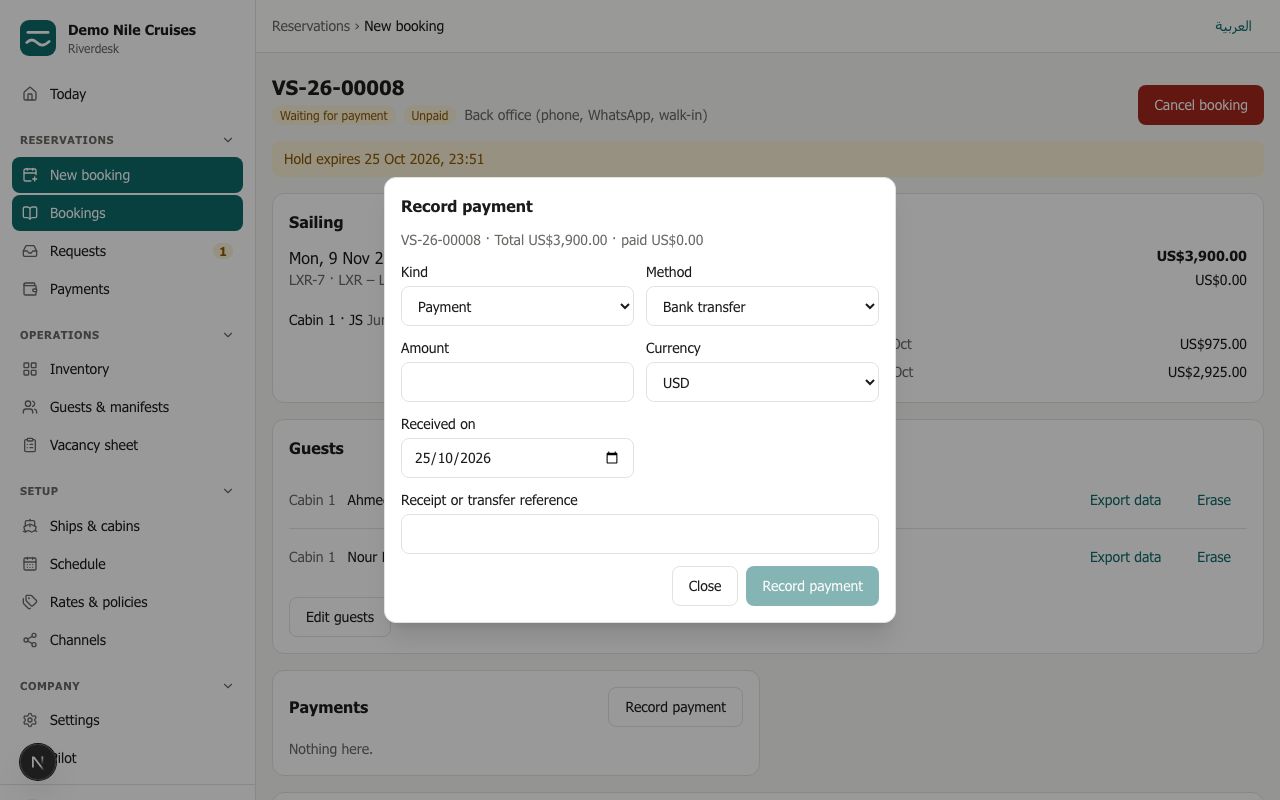
- Open the booking and press Record payment in the Payments card. You can also press Record payment on the Payments screen and find the booking by its reference. The dialog shows the booking's total and what has been paid so far.
- Choose the Kind. Pick Deposit for the first payment, Balance for the rest, or Payment for anything in between. The kind is a label for your records; Riverdesk adds every payment to the amount paid either way.
- Choose the Method. Bank transfer, Cash, Card (office), Agent remittance, Collected by channel or Online gateway. This is what you will filter by when you reconcile with the bank.
- Enter the Amount and the Currency. The currency starts as the booking's own. For a USD booking paid in US dollars, type the amount and move on.
- Enter the Receipt or transfer reference and the Received on date. Use the bank's transfer number or your receipt number, so anyone can trace the money later. The date is the day the money arrived, not today if you are catching up.
- Press Record payment.
A direct booking waiting for payment becomes Confirmed as soon as the payments reach its deposit. It then leaves Deposits due on Today. When the full amount is paid, the balance leaves Today too.
A payment in another currency
Guests sometimes pay a USD booking in Egyptian pounds or euros. Choose the currency they actually paid in, and a new field appears: Exchange rate (1 EGP = ? USD). Type the rate you used, for example 0.0205. Riverdesk credits the booking in its own currency, so the balance is always in USD, and the ledger keeps the amount exactly as it was received.
Refund a guest
After a cancellation, the booking shows Refund due when the guest paid more than the cancellation penalty and fees.
- Press Refund on the booking. Riverdesk shows Still to refund and fills in the amount for you: what was paid, minus the penalty and any fees kept.
- Check the amount, choose the Method, and enter the reference and the Refunded on date. Refunds are always in the booking's currency.
- Press Refund. The refund appears in the booking's payments, and Refund due clears once nothing more is owed back. You can refund in several parts if the money goes back in more than one transfer.
Reverse a mistake
Nothing in the payments ledger is ever edited or deleted. If you recorded a payment by mistake, you add an opposite entry, so the history always shows what happened.
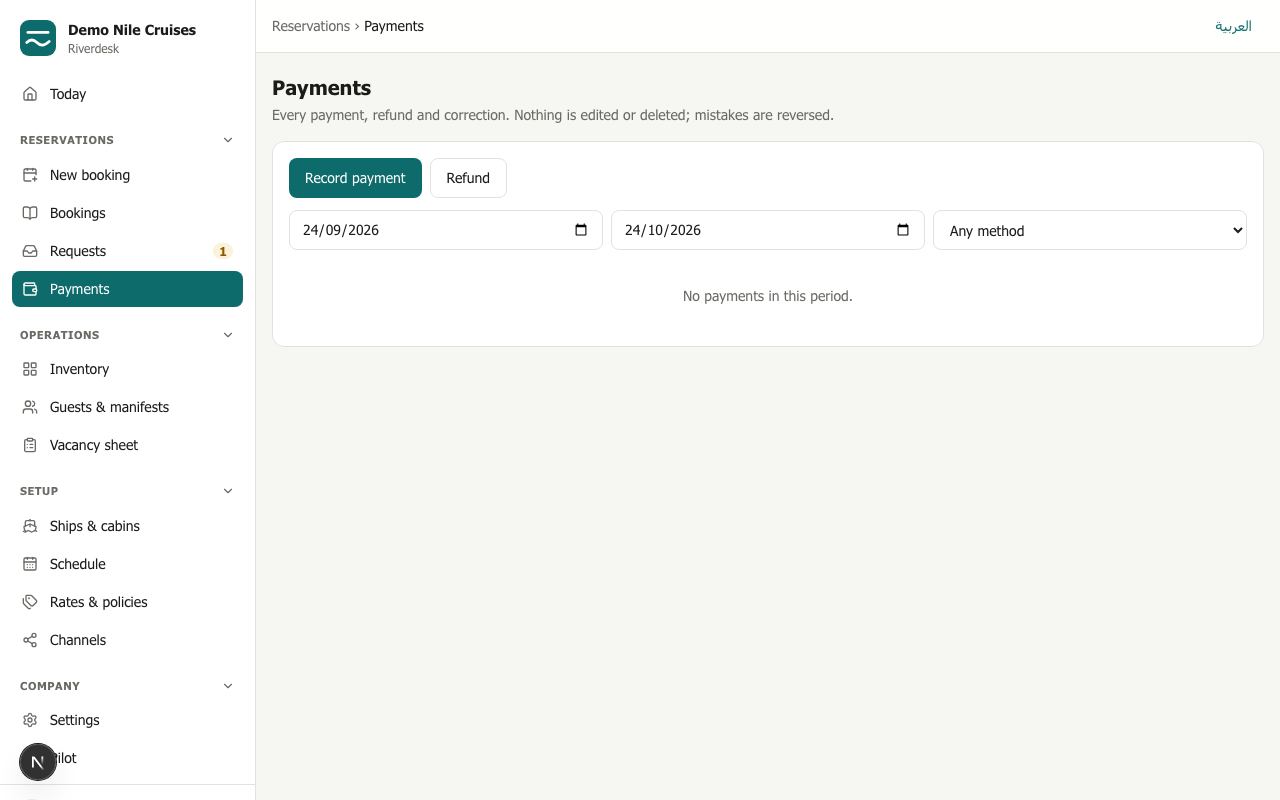
- Open Payments and find the line. Filter by date or method if the list is long.
- Press Reverse on that line. Choose a reason, such as Wrong amount entered, Recorded on the wrong booking, Payment bounced or was returned or Recorded twice, and confirm.
- Record the correct payment if there is one. The reversed line stays, marked Reversed, and the booking's paid amount goes back down.
Keep Today clear
Today lists the money that needs a person, for your own direct bookings:
| On Today | What it means | What to do |
|---|---|---|
| Deposits due | Bookings waiting for their deposit, with the amount still due | Record the deposit when it arrives |
| Balances overdue or due within 3 days | Balances by their due date; those past it are marked Overdue | Remind the guest, then record the payment |
| Paid but the cabin is unavailable | A guest paid after the hold ran out, and the cabins had been sold | Offer another cabin or date, or refund |
Each line opens the booking. It disappears by itself once the payment is recorded.
When a balance is not paid
Once a balance date has passed unpaid, Riverdesk's daily check flags the booking as an exception on Today and tells the channel. What happens after that is set in the booking's payment policy:
- With Cancel unpaid bookings automatically off (the default), nothing more happens on its own. The booking stays confirmed and on Today until you collect the money or cancel it.
- With it on, the booking is cancelled the set number of days after the balance date, the Cancel after (days past the balance due date). The cancellation follows the booking's own cancellation policy, and its cabins return to sale.
Owners change this on Rates & policies, in the payment policy. Bookings already sold keep the policy they were sold with.
What happens next
At the end of the day or the month, the Payments screen gives you the totals per currency and kind, filtered by date and method, to reconcile with your bank and cash book. Overdue balances that you decide not to chase are cancelled from the booking, which works out any refund due.